
AI & APIs
DeepSeek DeepInfer Explained: What It Is and How to Use It
Understand DeepSeek DeepInfer: what it does, supported hardware, source installation, offline inference, structured output, benchmarks, and production limits.
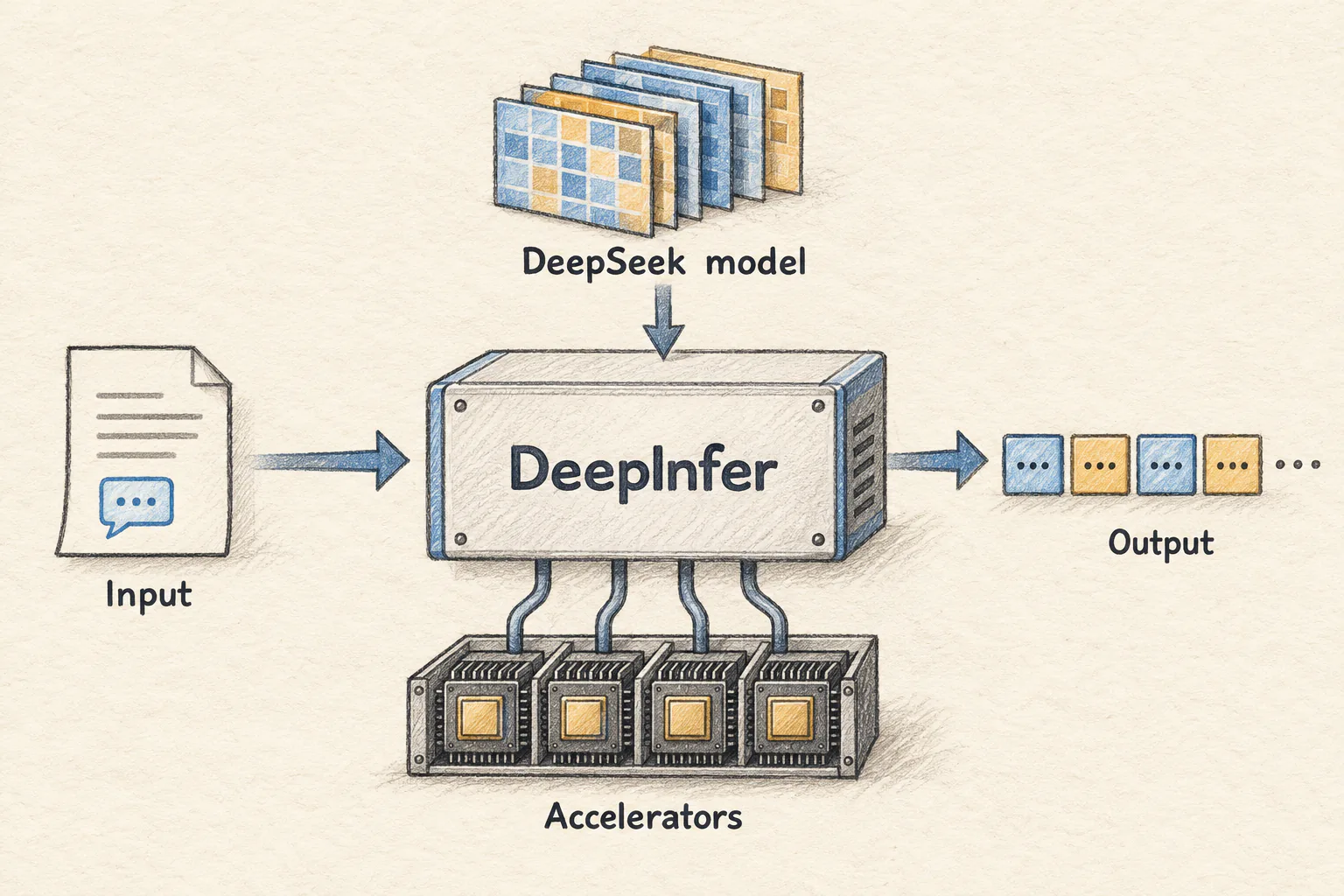
DeepInfer is DeepSeek's open-source inference framework: software that runs a trained model on accelerators and turns inputs into generated tokens. DeepSeek describes it as the framework behind its large-scale production services; the public release exposes offline inference and important engine capabilities.
That distinction matters. Downloading DeepSeek model weights gives you the model's learned parameters. Running those weights efficiently, coordinating devices, and choosing the next output token require additional software. DeepInfer handles that execution work.
This guide explains what DeepSeek DeepInfer does, the hardware it currently supports, how to build it, and how to run the official examples. It also shows a small structured-output example and explains what remains to be built for an online service.
Source check: October 23, 2026. This article follows DeepInfer commit 9bd9cf2. Commands and Python examples were checked against that source; Python snippets were syntax-checked. We did not run accelerator inference or reproduce DeepSeek's benchmark results on the machine used to prepare this article.
1. What is DeepSeek DeepInfer?
Imagine that you have a detailed musical score and an orchestra. The score contains the information, but somebody still has to coordinate which instrument plays, when it plays, and how the parts fit together.
For a language model, the weights are closer to the score. An inference engine coordinates the computation. DeepSeek develops the models; DeepInfer is one piece of the software that executes them.
The names refer to different layers:
| Name | What it means here |
|---|---|
| DeepSeek | The organization publishing the model and framework |
| DeepSeek-V4.1-Flash | The model family listed as supported by this DeepInfer revision |
| DeepSeek-V4.1-Flash-1017 | The default checkpoint selected by the example scripts |
| DeepInfer | The inference engine and related runtime code |
| An online inference service | A larger system that also handles incoming requests, routing, and service operations |
DeepInfer is useful when you need to understand or operate the execution layer. Someone who only wants to send a prompt to an existing hosted endpoint is working at a different layer and does not need to compile an inference engine for that task.
DeepSeek releases DeepInfer under Apache 2.0. The framework's license should be considered separately from the terms of any model checkpoint you deploy. The supported model, hardware, and public-release scope are documented in the official DeepInfer README.
2. Why DeepSeek needs an inference engine
Consider a service that receives a long document and must write a short answer. It has two kinds of work to do.
First, it processes the input. This phase is called prefill. Then it generates a continuation through repeated decoding steps. This second phase is called decode.
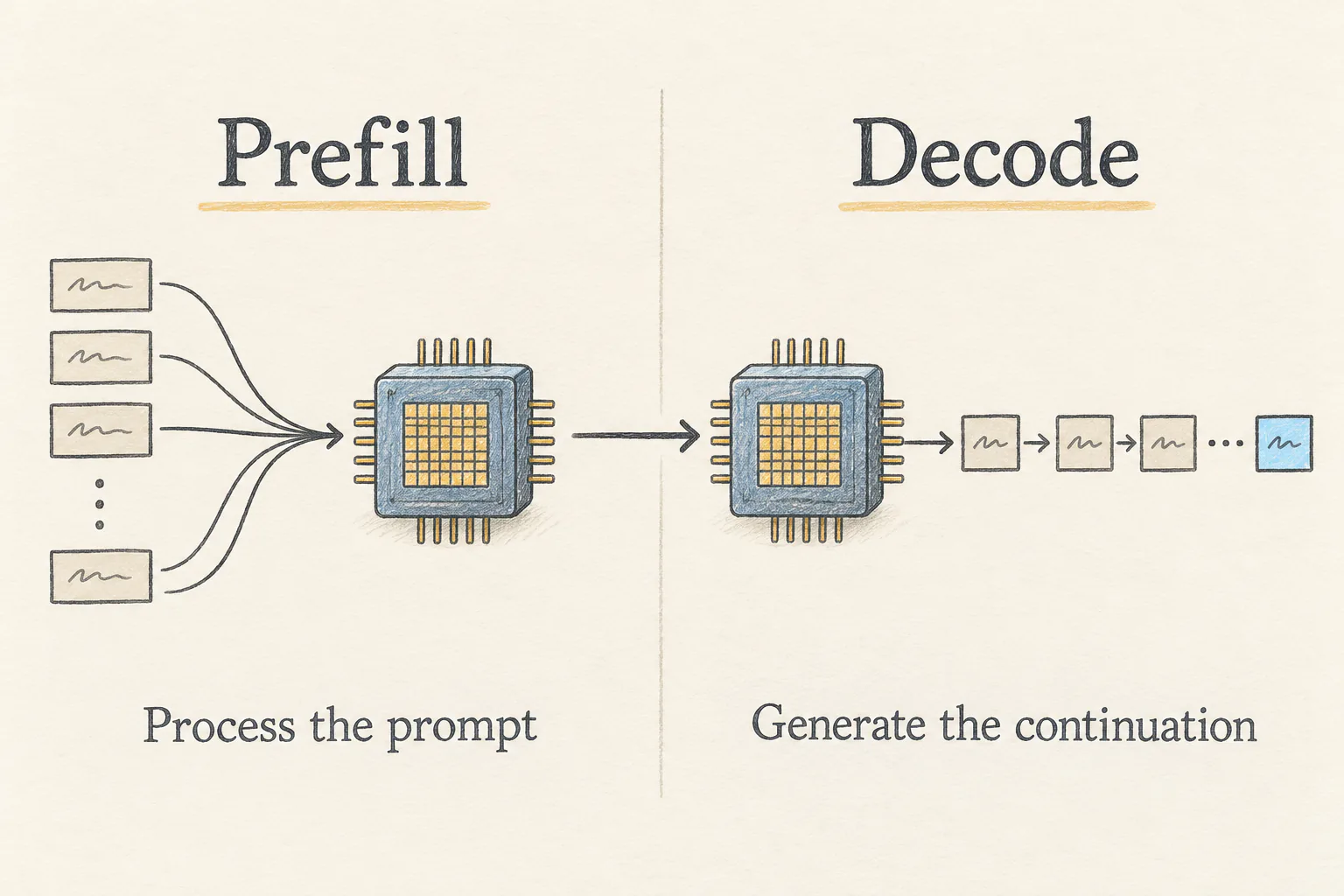
A busy deployment must coordinate this work across many requests and devices. A fast individual computation is only part of the problem: devices can also spend time waiting for scheduling or communication.
DeepInfer addresses several parts of this problem. Its runtime combines optimized computation kernels, parallel execution, asynchronous scheduling, and decoding techniques that propose draft tokens and verify them. DeepSeek also exposes controls for repeatability and output formatting.
Three terms help when reading the configuration:
- Data parallelism (DP): distributes request work across attention-side replicas.
- Context parallelism (CP): shares attention work for a context across devices.
- Expert parallelism (EP): distributes mixture-of-experts computation; expert load balancing (EPLB) helps spread that work.
DeepSeek DeepInfer combines these forms of parallelism. Consequently, --ep, --dp, and --cp describe related parts of a topology. They are not independent speed settings that you can increase without checking device capacity and the launcher's constraints.
3. Check DeepInfer compatibility first
At the revision reviewed here, DeepSeek lists a specific set of supported platforms:
| Requirement | Documented value |
|---|---|
| Operating system | Linux |
| Python | 3.12 |
| Compiler | GCC 13.0 or newer |
| NVIDIA hardware | SM100 GPUs |
| NVIDIA toolkit | CUDA 13 |
| Huawei hardware | Ascend 950 NPUs |
| Huawei toolkit | CANN 9.2 |
| Listed model support | DeepSeek-V4.1-Flash |
A CUDA installation alone does not establish that your GPU is supported. Likewise, a model being published by DeepSeek does not mean that this DeepInfer revision can run it. Check the actual accelerator architecture and checkpoint before provisioning a machine.
The official offline example defaults to --ep 8. Treat that as an example topology, not a published minimum-memory guarantee. The number of devices you need also depends on the checkpoint, memory capacity, context length, batch settings, and interconnect.
For NVIDIA hardware, these commands report some of the local prerequisites:
python3.12 --version
gcc --version
nvcc --version
nvidia-smi
The commands above inspect Python, the compiler, the CUDA compiler, and the detected GPUs. Their presence is a starting check; compare the actual versions and hardware with DeepSeek's prerequisites.
4. Build DeepSeek DeepInfer from source
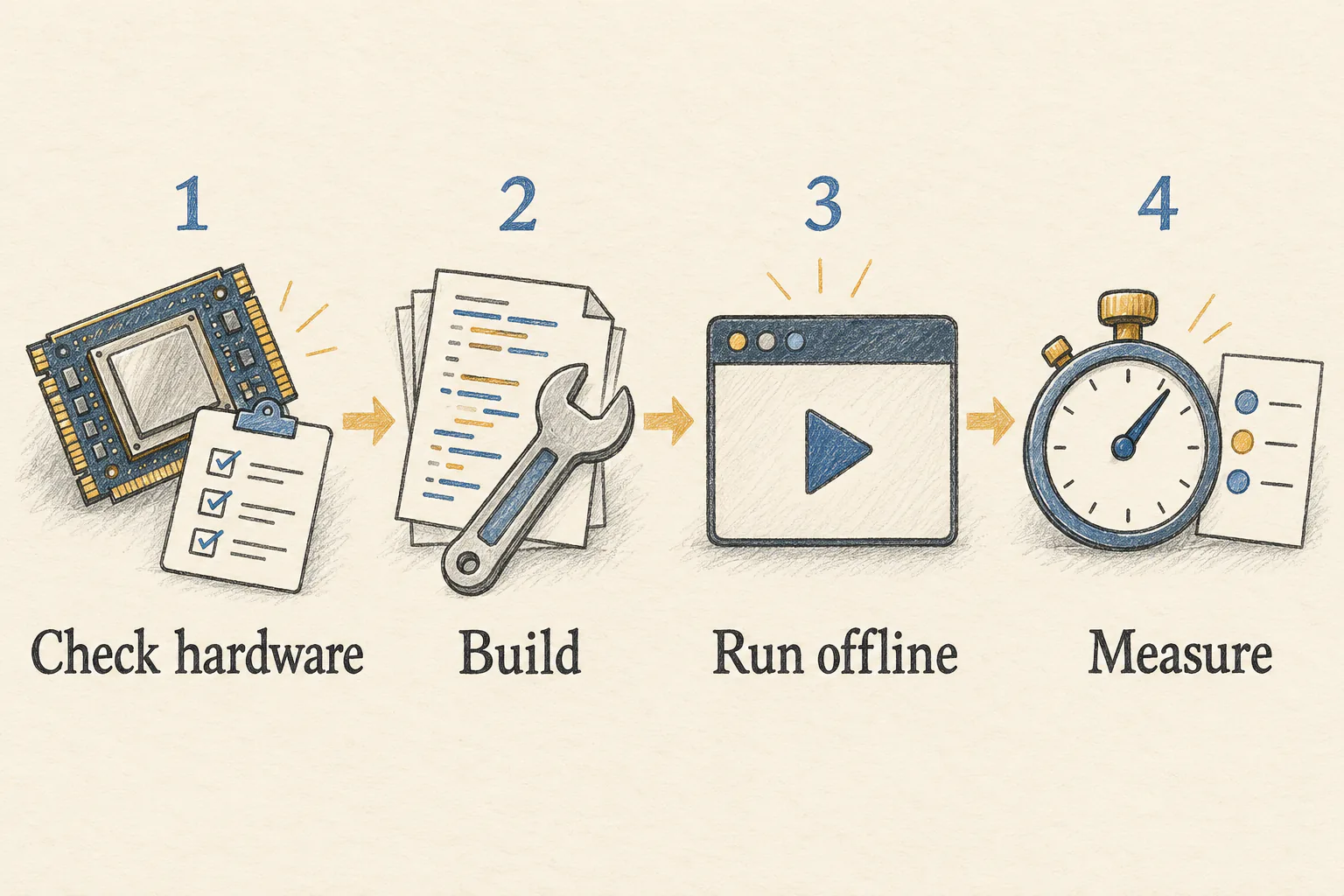
Use a dedicated environment on a supported Linux machine. The practical sequence is to verify the platform, build DeepInfer, validate offline output, and then measure performance.
Start by fetching the source. The checkout below selects the revision reviewed in this article so later changes on the main branch do not silently change the tutorial.
org=https://github.com/deepseek-ai
git clone "$org/DeepInfer.git"
cd DeepInfer
git checkout 9bd9cf2
python3.12 -m venv .venv
source .venv/bin/activate
The commands above create an isolated Python 3.12 environment inside the checkout. Keep it active for both building and running DeepInfer.
For a supported NVIDIA system, select the accelerator and invoke the repository's build script:
export \
  DEEPINFER_ACCELERATOR=nvidia
./build.sh
In this example, DEEPINFER_ACCELERATOR selects the NVIDIA build path. Keep the variable exported when running DeepInfer. On a supported Ascend system with CANN 9.2, use ascend instead and follow that platform's environment setup.
The build script installs platform dependencies, builds vendored operators, and builds DeepInfer itself. The vendor build script initializes the required Git submodules. This is a native build with accelerator dependencies, so allow for compilation time and network access.
5. Run DeepSeek offline inference
Once the build succeeds, run the supplied example from the repository root:
python \
  examples/offline_inference.py \
  --ep 8
Here, --ep 8 makes the example's default expert-parallel size explicit. The remaining topology must fit your actual allocation. The script exercises supplied samples and prints generated output plus diagnostic fields; it does not start an HTTP server.
DeepInfer's default model identifier is deepseek-ai/DeepSeek-V4.1-Flash-1017. On the first run, the helper downloads that checkpoint into the Hugging Face cache if it is not already present. Check the checkpoint's storage requirements before starting the download.
If you already have the complete DeepSeek checkpoint locally, set its real directory:
export DEEPINFER_HF_MODEL_DIR=\
/models/DeepSeek-V4.1-Flash-1017
python \
  examples/offline_inference.py \
  --ep 8
In the example above, /models/DeepSeek-V4.1-Flash-1017 is a directory you must replace with your own path. It needs the checkpoint's configuration and weights, not just an empty folder. This variable redirects the default model; it does not override an explicit --model_name argument.
Look for generated text, output-token counts, draft-token acceptance information, and decode_ppl diagnostics. A completed run is useful evidence that the model and engine work together on your setup. It does not establish application accuracy or production capacity. The behavior is defined in the offline example and model-loading helper.
6. Give DeepInfer your own prompt
The official example constructs its test prompts in examples/_prompts.py. After the unmodified example works, a small addition inside main() lets you reuse its initialized llm and distributed setup.
Place this block before llm.close() in examples/offline_inference.py, indented to match the surrounding function body:
from deepinfer import (
    sampling_params as sp,
)

prompt = (
    "Complete this sentence: "
    "A useful software test should"
)
params = sp.SamplingParams(
    temperature=0, max_tokens=64,
)
outputs = llm.generate(
    prompts=[prompt],
    sampling_params=params,
    use_tqdm=False,
)
tokens = [t.token_id
          for t in outputs[0]]
text = llm.get_tokenizer().decode(
    tokens,
    skip_special_tokens=True,
)
print(text)
In this block, llm is the existing initialized engine, max_tokens limits the continuation, and the final lines decode the returned token objects. This is an insertion into the working example, not a standalone initialization script. With multiple data-parallel workers, each worker executes the addition.
The prompt deliberately asks for a plain continuation. A chat application should use the format appropriate to its chosen DeepSeek checkpoint. Do not assume that a familiar messages dictionary from a hosted API is the input format of this Python call. The source for DeepInfer's LLM entry point is the reference for the engine API.
7. Use DeepSeek DeepInfer for structured output
Suppose an application needs to route a support ticket to billing, bug, or other. A paragraph may be readable to a person, but a fixed JSON object is easier for application code to consume.
DeepInfer supports constrained generation through regular expressions, JSON schemas, and EBNF grammars. First, run the repository's built-in checks:
python \
  examples/offline_inference.py \
  --ep 8 --check_structured_output
The flag above reuses the loaded DeepSeek model after the ordinary samples and validates the structured-output cases, including normal termination.
For an application-specific example, replace the previous custom block with the following code in the same initialized main() function:
import json
from deepinfer import (
    sampling_params as sp,
)

schema = {
    "type": "object",
    "properties": {
        "route": {
            "type": "string",
            "enum": [
                "billing", "bug",
                "other",
            ],
        },
    },
    "required": ["route"],
    "additionalProperties": False,
}
schema_json = json.dumps(schema)
params = sp.SamplingParams(
    temperature=0, max_tokens=64,
    so_args={
        "schema_type": "json",
        "schema": schema_json,
    },
)
Here, schema defines the permitted object, and params passes it to DeepInfer's sampler. Continue in the same function with a short ticket and decode its response:
prompt = (
    "Route this ticket: "
    "I was charged twice. "
    "Return JSON."
)
outputs = llm.generate(
    prompts=[prompt],
    sampling_params=[params],
    use_tqdm=False,
)
tokens = [t.token_id
          for t in outputs[0]]
text = llm.get_tokenizer().decode(
    tokens,
    skip_special_tokens=True,
)
print(json.loads(text))
In this example, the schema requires one route field and limits its possible strings. json.dumps(schema) supplies the schema in the form used by DeepSeek's structured-output example.
The intended classification is billing; it is not a measured result from this article. Constrained output controls the shape and permitted values. You must still check whether the answer is correct, whether generation completed, and whether your application can handle a failed or truncated response.
8. Benchmark DeepInfer without misreading the numbers
Only measure performance after DeepSeek DeepInfer produces valid outputs on your hardware. Record the source revision, checkpoint, accelerator model, device count, context length, batch settings, and speculative-decoding settings with every result.
For a single node containing eight supported NVIDIA devices, the following example makes the device allocation explicit and disables profiling while measuring:
export WORLD_SIZE=1 RANK=0
export CUDA_VISIBLE_DEVICES=\
0,1,2,3,4,5,6,7
PROFILE=0 \
  python examples/benchmark.py \
  --prompt_mode text \
  --decode_num_requests 8 \
  --result_jsonl results.jsonl
Here, WORLD_SIZE means the number of nodes in the example launcher. The visible-device list contributes to the inferred parallel scale. Replace that list with the devices actually allocated to you; these values are not a universal minimum-hardware recipe.
The benchmark separates prefill and decode settings. For example, --prefill_batch_size controls prefill chunking, while --decode_num_requests controls the decode batch. Increasing one does not simply increase the other.
Read DeepSeek's reported throughput carefully. The example documentation calculates decode throughput using full draft-acceptance accounting, even when the actual acceptance rate differs. That accounting is not equivalent to counting only the output tokens accepted and delivered to a user. A comparison should state the acceptance assumptions and also inspect latency and observed output.
The headline DeepInfer charts use four SM100 GPUs for prefill and 64 for decode, each within one scale-up domain. They describe those test configurations. They do not predict the result of the eight-device command above. See the benchmark methodology and official performance section.
9. Three DeepInfer settings worth understanding
Do not enable every optimization at once. Start from a working example, change one setting, and compare output correctness as well as runtime behavior.
The following controls apply to the reviewed DeepInfer revision:
DEEPINFER_USE_NEXTN_DECODEcontrols the maximum draft length. The documented default is 5; 0 disables speculative decoding in the examples.DEEPINFER_ENABLE_MTP_VARLEN=1enables the documented DSpark and confidence-scheduled verification path.DEEPINFER_BATCH_INVARIANT=1enables batch-invariant inference on the supported NVIDIA path.
DeepSeek's deterministic-sampling recipe additionally requires DEEPINFER_ENABLE_MTP_VARLEN=0 and a fixed seq_seed in SamplingParams, alongside batch invariance. Setting a seed alone is not the complete documented recipe. These controls and their platform limits are listed in the DeepInfer feature configuration.
10. What a production DeepSeek service still needs
The public DeepInfer release is an engine foundation. DeepSeek explicitly lists three pieces needed for a complete inference service that are not included as a complete service implementation:
- A KV cache system, which manages reusable attention state at the service level.
- Separation of vision encoding, prefill, and decode into service stages, although much of the engine functionality is already present.
- Load balancing across data-parallel replicas for prefill and decode.
This does not mean the engine performs inference without internal attention state. It means the README distinguishes engine functionality from the complete service infrastructure around it.
For your own deployment, you would also plan request admission, authentication, monitoring, failure handling, and capacity limits. Those are application and operations responsibilities; this tutorial does not provide a completed serving stack.
The relationship to other projects is also worth keeping precise. DeepSeek says DeepInfer was originally built primarily on vLLM, with additional inspiration from SGLang and TensorRT-LLM. That history does not establish drop-in CLI or server compatibility. Use the commands and APIs documented in the DeepInfer repository.
11. Common questions about DeepSeek DeepInfer
Is DeepInfer a new DeepSeek model?
No. DeepInfer is inference software. DeepSeek-V4.1-Flash is the model family explicitly supported by the revision reviewed here; its weights are loaded separately.
Can I run DeepInfer on a laptop or any CUDA GPU?
The documented targets are Linux with NVIDIA SM100 or Huawei Ascend 950 accelerators. The README does not document a CPU-only, macOS, or general consumer-GPU execution path for this release.
Can DeepInfer run every DeepSeek checkpoint?
Do not assume so. Check the supported-model list and the loader before selecting a different checkpoint. A shared publisher name does not guarantee architecture compatibility.
Does the offline command create an OpenAI-compatible server?
No. It runs offline samples. An HTTP service requires additional integration and the service components described above.
Does DeepInfer make every answer correct?
No. Faster execution and valid JSON are different from a correct answer. Evaluate DeepSeek model outputs on representative tasks, including difficult cases and failures.
12. Where to start
DeepSeek DeepInfer makes the execution layer visible: how a DeepSeek model is loaded, how computation is coordinated, and how tokens are generated. Its immediate value is greatest for engineers studying or operating inference on the supported accelerator platforms.
Start with a compatible machine and the unchanged offline example. Once that works, add one small prompt, validate structured output if you need it, and measure your actual workload. That sequence gives you evidence for deciding whether DeepInfer belongs in your DeepSeek deployment.
The primary references are the DeepInfer repository, its example guide, and the Apache 2.0 license. Illustrations in this article are original AI-generated conceptual drawings, not screenshots or benchmark measurements.