
AI & APIs
Getting Started with the OpenAI Decisions API: Three Ways to Connect
Use one support ticket to learn three ways to call the OpenAI Decisions API, compare request formats, and handle probabilities, scoring, costs, and limits.
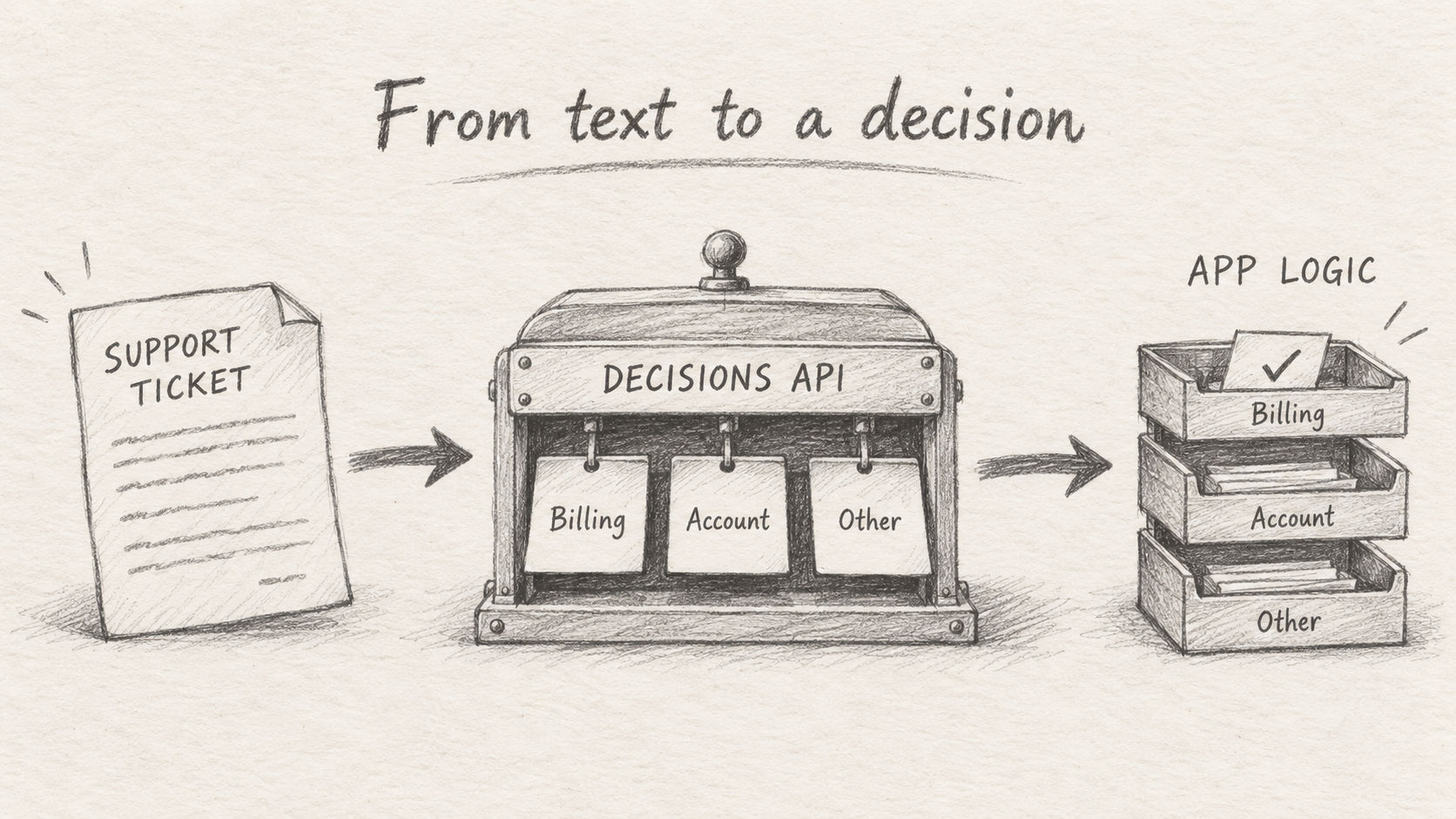
The OpenAI Decisions API is an interface for classification and scoring. You provide some evidence and a set of questions; it returns choices, probabilities, or scores that your application can use.
Many products need these judgments: which team should receive a support ticket, whether a message requires follow-up, or which severity level fits an incident. To turn them into application behavior, you need clear inputs, options, and response formats.
OpenAI released the Decisions API in beta on October 6, 2026, with gpt-6-luna. The model is also available through OpenRouter and decisions-api.dev. OpenAI changelog, OpenRouter model page, decisions-api.dev model page.
This tutorial uses one support-ticket routing example to explain all three integrations. Their request formats differ, so it helps to understand the differences before writing your first call.
1. Define the question and its possible answers
Suppose your support system receives this ticket:
Order R-208 was charged twice. Please return the extra payment.
Your application needs to send it to the billing team, the account team, or a general queue. Start with three fixed business values: billing, account, and other.
Think of a sorting clerk with a printed routing sheet. The address on a parcel is the evidence; the boxes on the sheet are the available destinations. The clerk chooses a box, and the delivery process uses that choice.
In the API, the ticket is the input, the routing instructions are the question, and the destinations are the choices. Clear definitions make the result easier to connect to your business logic.
There are three basic question types. The native API and the gateway APIs use the following names. OpenAI request schema, OpenRouter Decisions schema.
| What you want to know | OpenAI native type | OpenRouter and this site's type | Main result |
|---|---|---|---|
| Does the ticket request a refund? | predicate |
noul |
Probability that the condition is true |
| Which team should handle it? | choice |
choice |
Selected value and a probability distribution |
| How high is its priority? | score |
score |
Score on ordered levels and a probability distribution |
Teams are categories without an order, so use choice. Low, medium, and high priority are ordered levels, so use score.
Include a fallback category. Here, other means that none of the defined teams fits. Your application can send it to a general queue instead of forcing an unfamiliar ticket into an unsuitable category.
2. Compare the three integrations
All three options provide access to OpenAI's decision model. You connect to different services, use different API keys, and read different JSON structures.
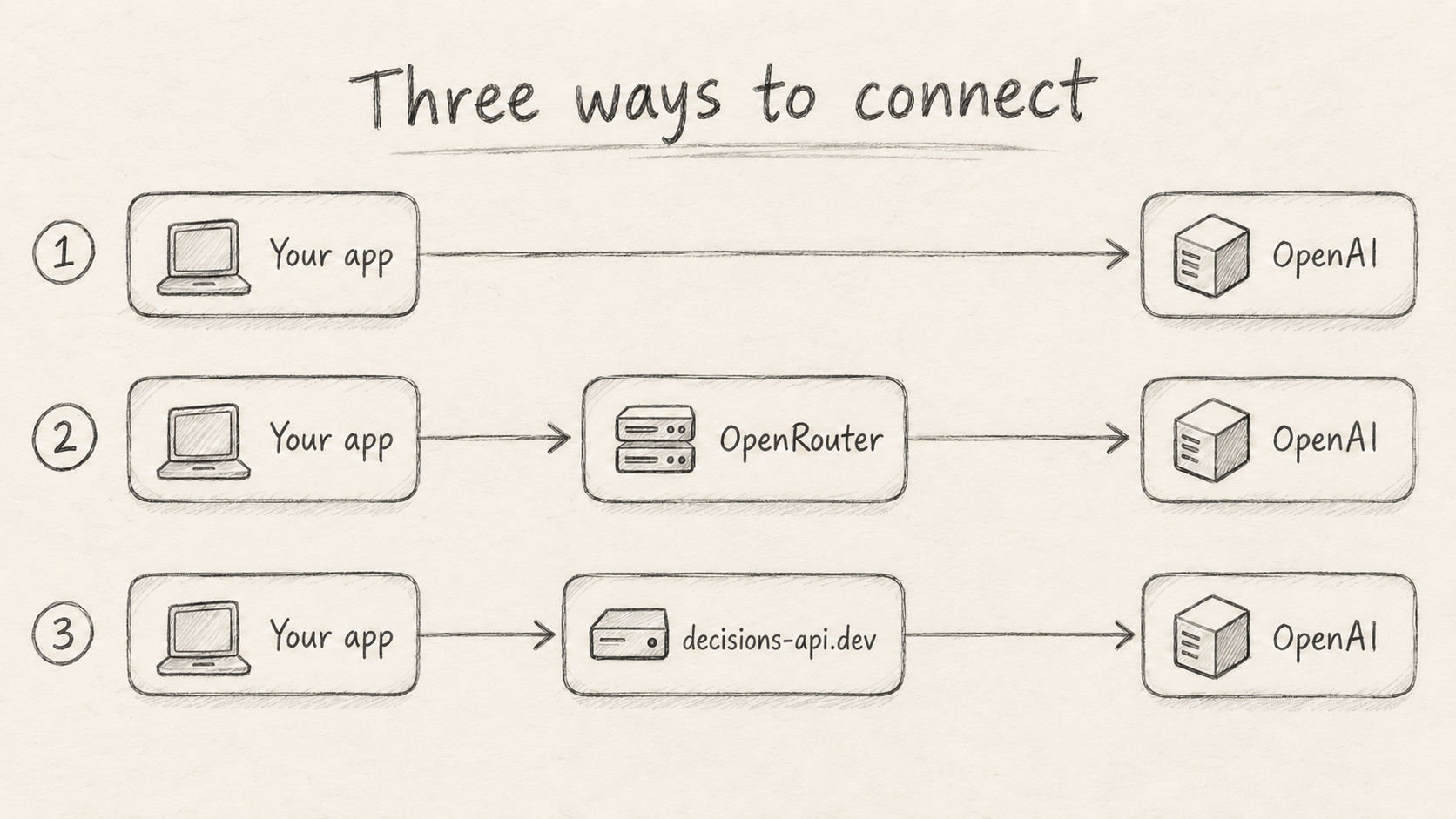
As of October 7, 2026, the main differences are as follows. OpenAI native endpoint, OpenRouter gateway endpoint, this site's API documentation.
| Item | OpenAI | OpenRouter | decisions-api.dev |
|---|---|---|---|
| POST URL | https://api.openai.com/v1/decisions |
https://openrouter.ai/api/alpha/decisions |
https://decisions-api.dev/v1/systemone |
| Model identifier | gpt-6-luna |
openai/gpt-6-luna-decisions |
openai/gpt-6-luna-decisions |
| API key issuer | OpenAI | OpenRouter | decisions-api.dev |
| Evidence field | input |
state |
state |
| Questions | Array; each question has a name |
Object keyed by question name | Object keyed by question name |
| Answers | answers array |
answers object |
data.result.answers object |
The illustration shows the application, the API entry point, and the model provider. It omits internal forwarding services. For this model, decisions-api.dev forwards requests through OpenRouter and applies its own credit and request limits. Integration details.
We will start with a minimal text request. Each environment variable below holds a key issued by its corresponding service. Replace the example values and run the commands in your terminal or on your server. Keep the keys on the server.
3. Option one: call OpenAI directly
If your project already uses OpenAI, you can call the native endpoint directly.
Save the following request as openai-request.json:
{
  "model": "gpt-6-luna",
  "input": "Order R-208 was charged twice. Please return the extra payment.",
  "questions": [
    {
      "name": "route",
      "type": "choice",
      "instructions": "Select the team responsible for this ticket. Choose other when no team fits.",
      "choices": [
        { "value": "billing", "description": "Charges, invoices, and refunds" },
        { "value": "account", "description": "Login and account access" },
        {
          "value": "other",
          "description": "Issues outside these teams' responsibilities"
        }
      ]
    }
  ]
}
Here, input is the evidence shared by every question. questions is an array, and route names this question. Each choice has a program-friendly value and a description of its meaning.
Next, send the request with curl:
export OPENAI_API_KEY="YOUR_OPENAI_API_KEY"

curl --fail-with-body https://api.openai.com/v1/decisions \
  -H "Authorization: Bearer $OPENAI_API_KEY" \
  -H "Content-Type: application/json" \
  --data-binary @openai-request.json
The authorization header uses your OpenAI key. --data-binary reads the JSON file you just saved. The Create a decision reference defines the response format.
The following response excerpt illustrates that format. These numbers are examples, not measurements from this ticket:
{
  "answers": [
    {
      "name": "route",
      "type": "choice",
      "choice": "billing",
      "probabilities": [
        { "value": "billing", "probability": 0.92 },
        { "value": "account", "probability": 0.03 },
        { "value": "other", "probability": 0.05 }
      ],
      "confidence": 0.84
    }
  ]
}
Here, choice is the selected business value. probabilities describes the distribution over the options. confidence is a separate field; do not substitute it for the selected option's probability.
The native API can return type: "refusal" for an individual question. Check the answer type before reading its choice or score. Other questions in the same request can still receive answers. Official refusal schema.
4. Option two: call through OpenRouter
If your project already uses OpenRouter, use its API key and the dedicated Decisions endpoint, /api/alpha/decisions. OpenRouter request documentation.
Save this request as gateway-request.json:
{
  "model": "openai/gpt-6-luna-decisions",
  "state": "Order R-208 was charged twice. Please return the extra payment.",
  "questions": {
    "route": {
      "type": "choice",
      "instructions": "Select the team responsible for this ticket. Choose other when no team fits.",
      "criteria": {
        "billing": "Charges, invoices, and refunds",
        "account": "Login and account access",
        "other": "Issues outside these teams' responsibilities"
      }
    }
  }
}
The model identifier now includes the openai/ prefix and the -decisions suffix. The evidence becomes state, the question name becomes an object key, and options are defined in a criteria object.
Send it to OpenRouter:
export OPENROUTER_API_KEY="YOUR_OPENROUTER_API_KEY"

curl --fail-with-body https://openrouter.ai/api/alpha/decisions \
  -H "Authorization: Bearer $OPENROUTER_API_KEY" \
  -H "Content-Type: application/json" \
  --data-binary @gateway-request.json
This request requires a key issued by OpenRouter. Its answers are organized by name, so read this answer at answers.route.
The same illustrative classification result uses this structure:
{
  "answers": {
    "route": {
      "type": "choice",
      "choice": "billing",
      "probabilities": { "billing": 0.92, "account": 0.03, "other": 0.05 },
      "confidence": 0.84
    }
  }
}
Both the answer collection and the probability distribution are objects here. When migrating native OpenAI code, update the request builder and the response reader together.
The model page lists text and image input, a 1,050,000-token context window, and up to 200 questions upstream. This tutorial uses one question and a short text input. Check current documentation and your account's availability before relying on the full advertised capacity. OpenRouter model details.
5. Option three: call through decisions-api.dev
decisions-api.dev offers this model in its workbench and API. The model page lets you try question definitions and inspect request formats; application calls use a key issued by this site. GPT-6 Luna Decisions model page.
For this model, reuse the gateway-request.json from the previous section. The site accepts the same model, state, and named-question object, but uses a different URL and response envelope. Integration quickstart.
Save the site's response to result.json; we will use it for the routing example later:
export DECISIONS_API_KEY="YOUR_DECISIONS_API_KEY"

curl --fail-with-body https://decisions-api.dev/v1/systemone \
  -H "Authorization: Bearer $DECISIONS_API_KEY" \
  -H "Content-Type: application/json" \
  --data-binary @gateway-request.json \
  --output result.json
Use your decisions-api.dev key in the authorization header. --output writes the JSON response to a local file for subsequent processing.
Here is an excerpt of a successful response. Usage fields are omitted, and the numbers remain illustrative:
{
  "code": 0,
  "message": "ok",
  "data": {
    "result": {
      "answers": {
        "route": {
          "type": "choice",
          "choice": "billing",
          "probabilities": { "billing": 0.92, "account": 0.03, "other": 0.05 },
          "confidence": 0.84
        }
      }
    }
  }
}
Here, code: 0 means the site's request succeeded. Read the classification at data.result.answers.route, token usage at data.result.usage, and credits charged at data.creditsUsed. Response documentation.
The site applies its own limits: at most eight questions, 32 KiB of text plus questions, and four images. The upstream context window does not automatically increase those limits. Site limits.
6. Add two more questions
Once routing works, you can also ask whether the ticket requests a refund and how urgent it is. Both questions evaluate the original ticket independently of the routing answer.
For OpenAI's native request, add this object to the questions array:
{
  "name": "needs_refund",
  "type": "predicate",
  "instructions": "Does the ticket explicitly request that money be returned?"
}
The predicate answer returns the probability that the condition is true in its probability field. Your application can use its own rules to decide whether to open a refund review.
Add this priority question to the same native array:
{
  "name": "priority",
  "type": "score",
  "instructions": "Rate the priority using only the impact explicitly described.",
  "levels": [
    {
      "label": "low",
      "description": "A question or suggestion; existing functionality remains usable"
    },
    {
      "label": "medium",
      "description": "A payment or functionality issue without a stated complete blockage"
    },
    {
      "label": "high",
      "description": "Core business is fully blocked and needs prompt attention"
    }
  ]
}
The levels run from low to high. Indices start at zero, so these levels correspond to 0, 1, and 2. The returned score is a probability-weighted average and can therefore be fractional, such as 1.4. Official scoring guide.
For OpenRouter or decisions-api.dev, add the following entries to the questions object instead:
{
  "needs_refund": {
    "type": "noul",
    "instructions": "Does the ticket explicitly request that money be returned?"
  },
  "priority": {
    "type": "score",
    "instructions": "Rate the priority using only the impact explicitly described.",
    "criteria": [
      "Low: a question or suggestion; existing functionality remains usable",
      "Medium: a payment or functionality issue without a stated complete blockage",
      "High: core business is fully blocked and needs prompt attention"
    ]
  }
}
The yes/no question is named noul in this contract, and its result field is also noul: the probability that the condition is true. Ordered score levels use a criteria array of strings. OpenRouter question formats.
Independent questions can share one request. If you need an earlier answer to formulate a later question, make separate calls. Official multiple-question guidance.
7. Handle uncertain results in application code
After receiving billing, your program still needs to decide whether to route automatically. That decision depends on your business rules and the returned probabilities.
For example, a sufficiently strong match can go to the selected team's queue. A weak match or an other result can go to human review.
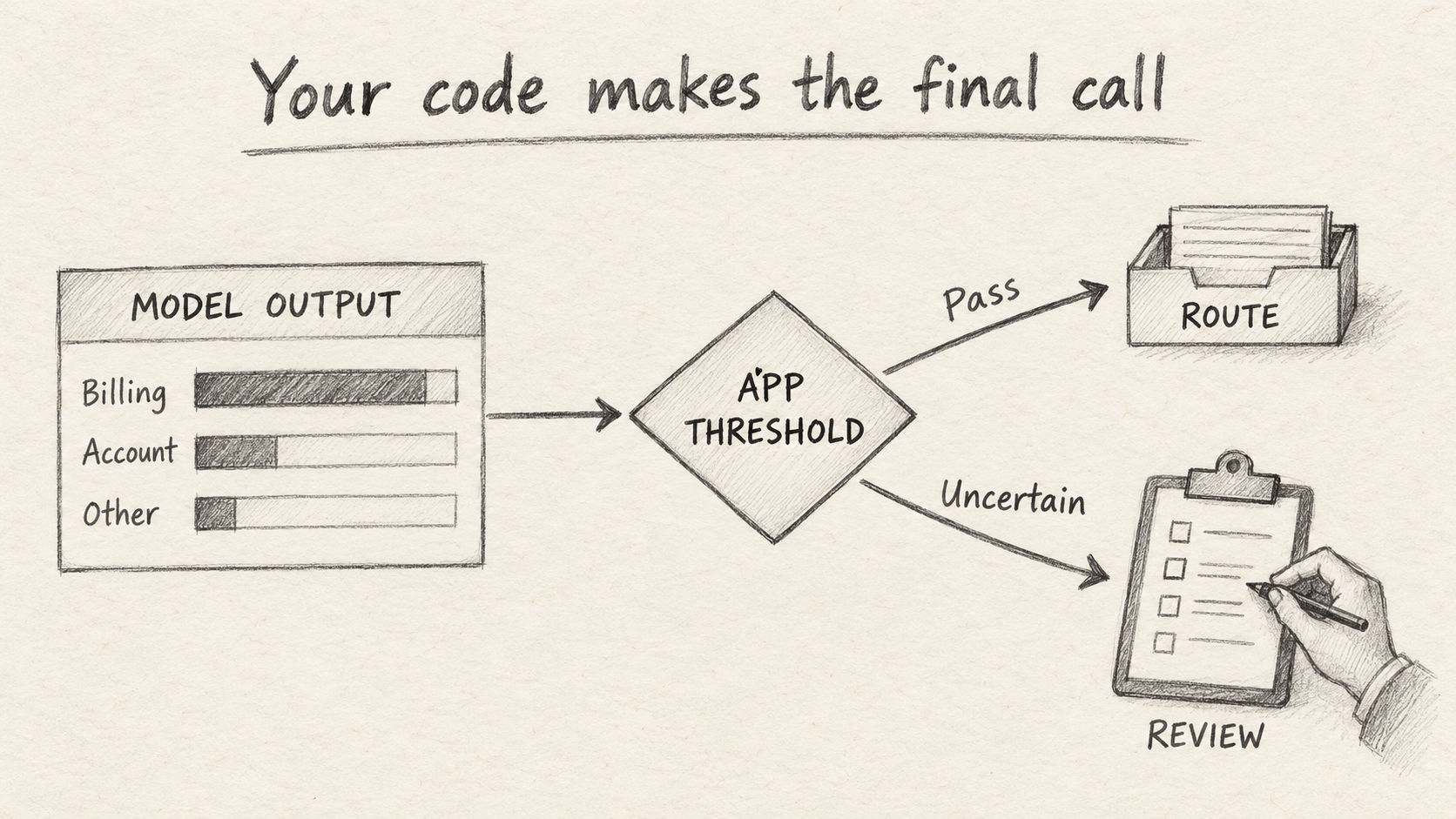
The following example reads the site's result.json. Save it as route.mjs and run node route.mjs. The threshold of 0.85 is only an example:
import { readFileSync } from 'node:fs';

const body = JSON.parse(readFileSync('result.json', 'utf8'));
if (body.code !== 0) throw new Error(body.message || 'Request failed');

const answer = body.data?.result?.answers?.route;
const probability = answer?.probabilities?.[answer.choice];
const canRoute =
  answer?.type === 'choice' &&
  ['billing', 'account'].includes(answer.choice) &&
  Number.isFinite(probability) &&
  probability >= 0.85;

console.log(canRoute ? answer.choice : 'manual-review');
The code checks the answer type, the allowed business values, and the selected option's probability. If any check fails, it emits manual-review for your queue logic to handle.
A probability threshold of 0.85 does not establish an observed accuracy of 85%. Evaluate real tickets with human-provided labels, then adjust the threshold based on routing errors and review volume. confidence is a separate signal and also needs validation. Official answer interpretation.
For refunds, keep the business steps explicit: the model identifies a refund request; your code then checks the order, payment records, and refund permissions. The decision call shown here performs classification.
8. Compare prices and limits together
The following base input prices were listed on October 7, 2026. Actual cost also depends on processed input and the service's billing rules.
| Integration | Base input price | Output charge | Source |
|---|---|---|---|
| OpenAI Decisions | $0.10 per million tokens | No output-token charge | Official pricing |
| OpenRouter | Model page lists $0.10 per million tokens | Model page lists $0 | Model pricing |
| decisions-api.dev | 1,500 credits per million input tokens, equivalent to $0.15 | No additional output charge | Site pricing and formula |
OpenAI's regional processing premiums and long-context input multipliers may apply beyond the base price. Check those rules before estimating a large-input workload. Official pricing conditions.
decisions-api.dev rounds each successful request up and charges at least one credit. Its formula for this model is:
credits = max(1, ceil(input_tokens × 1500 / 1,000,000))
Here, input_tokens is the actual input usage returned by the upstream provider, including questions and processed images. For example, 1,000 input tokens cost two credits; 5,000 cost eight. Minimum charges and rounding affect short requests. Site billing details.
Recheck the protocol when adding images. OpenAI places them in user messages within input, using input_image with inline data URLs. This site additionally accepts an images field and converts it before forwarding. Consult each service's rules for image counts, sizes, and URLs. OpenAI image schema, site image parameters.
For failed calls, check three areas: request fields for HTTP 400, the key's issuer for HTTP 401, and credits, request frequency, or payload size for HTTP 402, 429, or 413. Use the error message to identify the specific cause. OpenRouter error definitions, site error documentation.
Choose an integration that fits your existing project. Use the native endpoint if you already use OpenAI; use OpenRouter's Decisions gateway if it manages your models; use this site's endpoint if you want its workbench and credit system in the same workflow.
Start with one question and a few tickets. Then add questions, collect labeled cases, and tune your thresholds. That gives you a decision component you can evaluate and maintain as part of your product.
Sources checked on October 7, 2026. This tutorial was checked against public documentation, live service pages, and the repository's OpenRouter call records from that date. Writing it did not involve new authenticated calls to all three services. The ticket is original; response numbers illustrate formats and are not accuracy or performance evidence. Illustrations were created with ImageGen in pencil style with English labels.